
Artful Agenda - Plan in Style!
Artful LLCProductivity
4.02.27K Reviews
- Version
- 1.27.4
- Installs
- 500.00K
- Age Rating
- Everyone
Screenshots
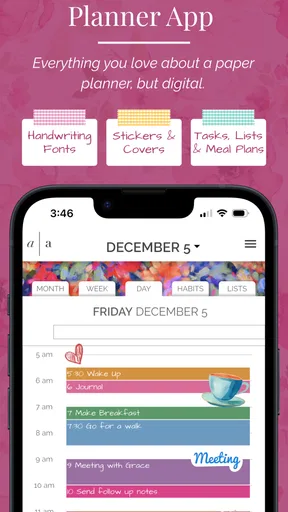
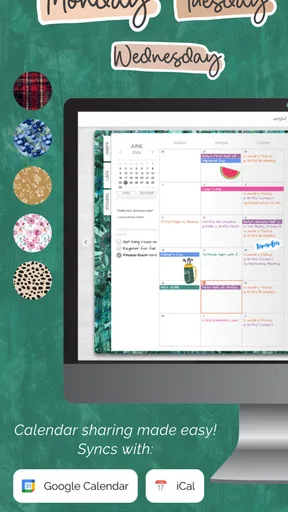
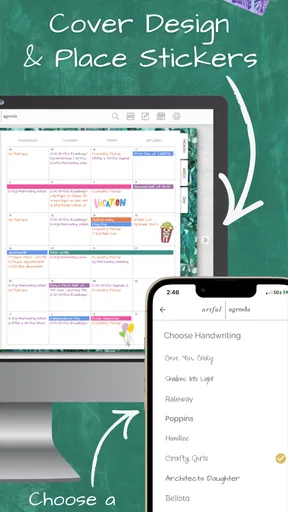
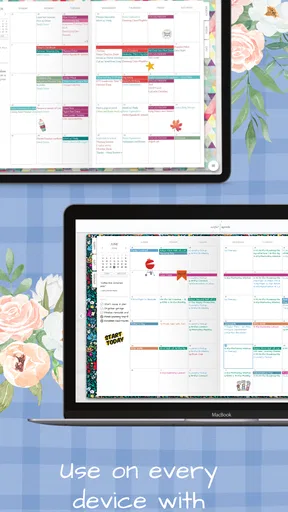
Our Review of Artful Agenda - Plan in Style!
 Analysis by Appyee
I tend to reach for a planner when my week starts feeling scattered: appointments live in a calendar, errands sit in a notes app, and the tasks I meant to do are on scraps of paper. Artful Agenda is aimed at that particular problem. It is a productivity app from Artful LLC that brings a paper-planner look to an online planning routine, and I think its appeal is less about replacing every tool than making the day’s commitments easier to see together.
Begin with the week you already have
My practical starting point would be to connect the calendars I already rely on, then use the planner view to see those appointments beside the tasks I want to complete. Calendar syncing is useful when several parts of life already have their own schedules; it can reduce the need to bounce between apps just to understand what a day looks like. I would still treat the first setup as a check-and-adjust stage: confirm that the right calendars are visible and that changes have carried across before relying on the combined view for a busy day.
The visual style matters here because a planner is only useful if I want to open it. Artful Agenda lets me choose a cover, and its paper-inspired presentation makes a digital schedule feel more like a familiar planner than a bare list. That may be a real advantage if standard calendar grids feel cold or if writing plans down helps you think. If you prefer a minimal interface with little decoration, the same emphasis on appearance may feel like extra visual weight rather than a benefit.
Turn appointments into a workable plan
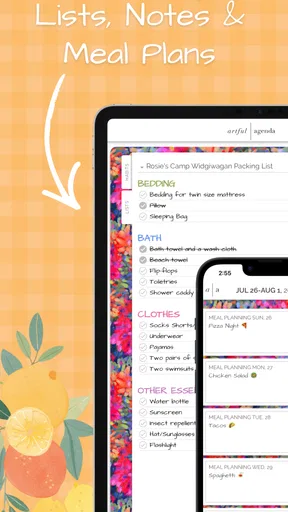
Once the calendar is in view, I would add the flexible parts of the day: tasks, notes, and meal plans. The useful distinction is between something that must happen at a particular time and something that simply needs space in the day. Keeping those ideas visible in one planning routine can make it easier to spot when an optimistic to-do list does not fit around fixed commitments. I find that more valuable than filling every open slot; a planner should help me make decisions, not make the day look busy for its own sake.
For example, imagine a weekday with a work meeting, a grocery stop, and dinner to sort out. I would keep the meeting as a calendar event, put the grocery errand on the task list, and note the meal plan alongside the day’s other details. Looking across those pieces helps me decide whether to shop before work or move the errand to another day. This is a simple workflow, but it shows why an integrated planner can be more useful than a calendar alone: the day’s obligations and the actions around them are easier to consider together.
Build routines without overloading the system
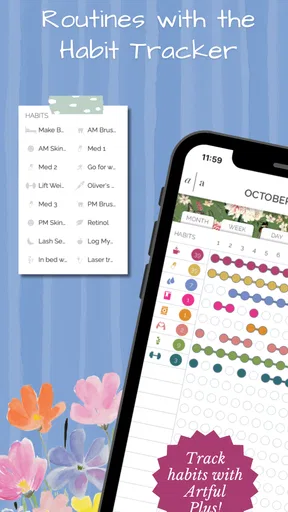
Goals and habit tracking give the planner a longer horizon than today’s appointments. I would use a goal for an outcome I want to work toward and a habit for a repeated action, rather than turning every small intention into a separate project. For instance, a broad goal can stay in view while a recurring habit helps me focus on the next manageable step. That distinction keeps progress from becoming another long checklist to maintain.
There is a trade-off: tracking only helps if I return to it honestly. If I miss a day, I would rather resume the routine than spend time trying to make the record look perfect. The app’s goal-setting and habit tools can support motivation, but they cannot decide which priorities matter or make an overfull schedule realistic. I would start with one routine and a small number of goals, then add more only if reviewing them remains helpful.
First Impressions and Getting Started
When I first downloaded Artful Agenda, I was immediately drawn in by its vibrant and customizable interface. It's like having a traditional planner, but with the added perks of digital convenience. Right off the bat, you can personalize your planner with different cover designs, which is a fun way to make it feel like your own.
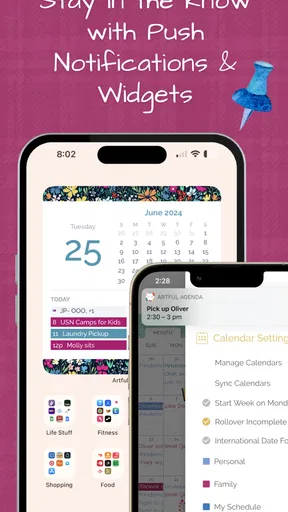
Setting up the app is a breeze. You can sync calendars from other platforms like Google Calendar, Apple Calendar, or Outlook, consolidating all your appointments in one place. I found this feature especially handy because it eliminated the chaos of switching between multiple apps.
Features That Stand Out
This app isn't just about looking pretty—though it certainly does that well! It's packed with features that make planning seamless. You can create daily, weekly, and monthly views, which helps in visualizing your schedule at a glance. I love how the app allows you to add notes, to-do lists, and even meal plans. It's a comprehensive planner that caters to all aspects of life.
One standout feature is the goal-setting section. You can set both short-term and long-term goals, and track your progress over time. This is perfect for anyone looking to stay motivated and organized. Plus, the habit tracker is a game-changer for building new routines.
Using Artful Agenda Daily
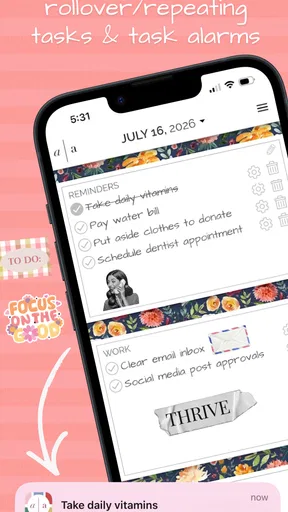
After a few days of using the app, I noticed a significant boost in my productivity. The reminders and notifications kept me on track, and the satisfaction of checking off tasks felt even better on the app's sleek interface. It's like having a personal assistant in your pocket!
Another thing I appreciate is the app's integration with contacts. It makes scheduling meetings or events a lot easier, as you can directly invite your contacts through the app. This feature is particularly useful for managing both personal and professional schedules without any hassle.
Room for Improvement
While the app is fantastic, there's always room for improvement. At times, I found the syncing process a bit slow, especially when making changes to events. Also, while the customization options are great, I would love to see more themes and stickers to make the planner even more fun and personalized.
What the handoffs feel like
A planner becomes more demanding when other people are involved. If I’m arranging a meeting, the contact integration and ability to invite people can help bridge the gap between deciding on a time and putting the event on the calendar. I would still check the final event details after sending an invitation, especially if several calendars are in play. A planner can help organize the handoff, but I would not assume that every participant has seen or accepted a change just because I entered it.
For shared household planning, I’d use the app to organize my own view of appointments, errands, and meal ideas, then communicate the specific decisions to the people who need them. That keeps the planner useful without treating it as a substitute for a conversation. Likewise, for work, I’d use it to prepare my day and track my own follow-ups, while keeping team decisions in whatever shared system the team already uses. This distinction matters: Artful Agenda is most compelling as a personal command center, not necessarily as the one source of truth for a whole group.
Choose the planning style that fits
Compared with a basic calendar, Artful Agenda gives more room for notes, to-dos, meals, goals, and habits around scheduled events. That broader canvas is helpful if you like to plan the whole day, not just reserve time blocks. A plain calendar may still be better if all you need is appointment management, fast event entry, and a clean view with no extra planning layers. The right choice depends on whether you want a planner you actively work in or a calendar you check briefly.
Compared with a paper planner, the digital format is easier to carry and can bring calendar information together, while the covers and planner-like layout retain some of the appeal of paper. Paper remains a better fit for people who think best by handwriting, want a completely offline routine, or dislike looking at a screen to plan. I would not choose Artful Agenda expecting a digital copy to feel exactly like pen and paper; its strength is combining that familiar visual approach with online convenience.
It also sits differently from a minimalist to-do list. A task-only app can be quicker for capturing a thought and clearing a queue, but it may not show how tasks relate to appointments and routines. Artful Agenda asks for a little more planning attention in exchange for context. My tip is to use the daily view to make a realistic short list, then use the wider weekly or monthly views to notice what is coming. That prevents the day view from carrying every future idea at once.
Who will get the most from it
I’d recommend trying it if you enjoy a visually warm planner, have several kinds of commitments to coordinate, and want tasks and personal routines close to your calendar. Students could use the different views to keep classes and study tasks in perspective; someone managing work and home responsibilities might appreciate seeing errands and meal planning alongside appointments. The app’s paper-inspired design is also a sensible fit for people who already like physical planners but want their schedule available digitally.
I would steer someone toward a simpler calendar if they only need reminders and appointments, or toward a dedicated shared calendar if their main challenge is coordinating a family or team in real time. I’d also hesitate to recommend a highly decorated planner to anyone who finds visual choices distracting. The app’s flexibility is useful, but it works best when the user is willing to maintain a personal planning habit rather than expecting the app to automatically sort priorities.
Cost, access, and everyday friction
Artful Agenda is free to download, with in-app purchases ranging from under a dollar to around fifty dollars per item. I’d look at the purchase details in the app before committing, and consider whether the core planning routine suits me first. Its average rating is four out of five from around 4,600 ratings, while more than 2,000 written reviews offer additional perspectives; those numbers can help set expectations, but they don’t tell me whether its particular style will click with my own habits.
The app is rated for everyone, has been available since March 27, 2019, and its current version is 1.26.2. It needs Android 6.0 or later, and it has passed 500,000 installs. Those details make it easier to judge basic device fit, but I’d still check that my calendar setup and daily routine are comfortable before moving all my planning into one place.
The main friction I’d watch for is the same one that appears in many calendar-connected tools: a sync delay can make a recent edit feel uncertain. Since I have experienced slower syncing after changing events, I would avoid editing an appointment at the last second and immediately assuming every view is current. For an important change, I’d reopen the relevant calendar view and verify what it shows. That small check is less annoying than discovering later that I planned around an outdated time.
When the plan meets a busy day
Picture a day that begins with an early appointment, continues with classes or work, and ends with an errand and dinner to prepare. Before the day starts, I’d scan the daily view, identify the immovable events, and choose just a few tasks that fit around them. I’d check the weekly view for anything approaching, then put a meal note where I can see it rather than leaving it as a vague intention. If a meeting changes, I’d verify the updated event before reshuffling the rest of the day.
That workflow gives the app a clear job: help me turn a loose collection of obligations into a sequence I can act on. The outcome is not a magically empty inbox or a perfectly optimized day; it is a more legible plan, with fewer mental reminders to carry around. If the day changes, the planner can help me reconsider the order, but I still have to decide what can move and what should be dropped.
Final Thoughts
All in all, Artful Agenda is a stellar app for anyone looking to elevate their planning game. Its blend of style and functionality makes it stand out in the crowded world of planner apps. Whether you're a busy professional or a student trying to manage your workload, this app could very well be the tool you need to stay on top of things.
So, if you're ready to ditch the chaos and plan in style, why not give Artful Agenda a shot? It's available for both Android and iOS, and trust me, your future self will thank you for it!
Verdict
Strengths of Artful Agenda - Plan in Style!
- Stylish and intuitive user interface.
- Syncs seamlessly with Google and Apple calendars.
- Customizable planner layouts and themes.
- Includes task management and note-taking features.
- Cross-platform accessibility on web, iOS, and Android.
Limitations of Artful Agenda - Plan in Style!
- Requires a subscription for full features.
- Limited offline functionality.
- No integration with some third-party apps.
- Occasional sync delays reported by users.
- Some features hidden behind premium tiers.
Similar Picks in This Category
View All
Google Calendar
Google LLC4.6

Google Drive
Google LLC4.3

Google Assistant
Google LLC3.9

Microsoft OneDrive
Microsoft Corporation4.6

Samsung Calendar
Samsung Electronics Co., Ltd.4.1

Microsoft OneNote: Save Notes
Microsoft Corporation4.6
Frequently Asked Questions
What is Artful Agenda and how does it differ from other calendar apps?
Artful Agenda is a digital planning app that combines the functionality of a traditional calendar with the aesthetics of a stylish planner. Unlike other calendar apps, Artful Agenda offers customizable designs, covers, and handwriting-like input. It caters to users who want both practicality and beauty in their scheduling tools, making it unique among digital planners.
Can I sync Artful Agenda with other calendar services?
Yes, Artful Agenda seamlessly integrates with popular calendar services like Google Calendar, Apple Calendar, and Outlook. This ensures that your events and reminders are always up-to-date across all platforms, providing a unified scheduling experience. Syncing is straightforward and requires minimal setup, making it user-friendly for all.
Is Artful Agenda available on both Android and iOS devices?
Artful Agenda is available on both Android and iOS platforms, ensuring compatibility with a wide range of devices. This cross-platform availability means you can access your planner from your smartphone, tablet, or computer, allowing for flexibility and convenience no matter where you are.
Does Artful Agenda offer any features for task management?
Yes, Artful Agenda includes robust task management features such as to-do lists, priority setting, and progress tracking. Users can organize tasks by category, set deadlines, and receive reminders. These features help users manage their time effectively and stay focused on their goals, enhancing productivity.
Is there a subscription fee for using Artful Agenda, and what does it include?
Artful Agenda operates on a subscription model, offering monthly and yearly plans. The subscription includes access to all design features, syncing capabilities, and updates. There is also a free trial available for new users to explore the app's full range of features before committing to a subscription.
